
02 / LIVE ORDERS
Every order. One clear view.
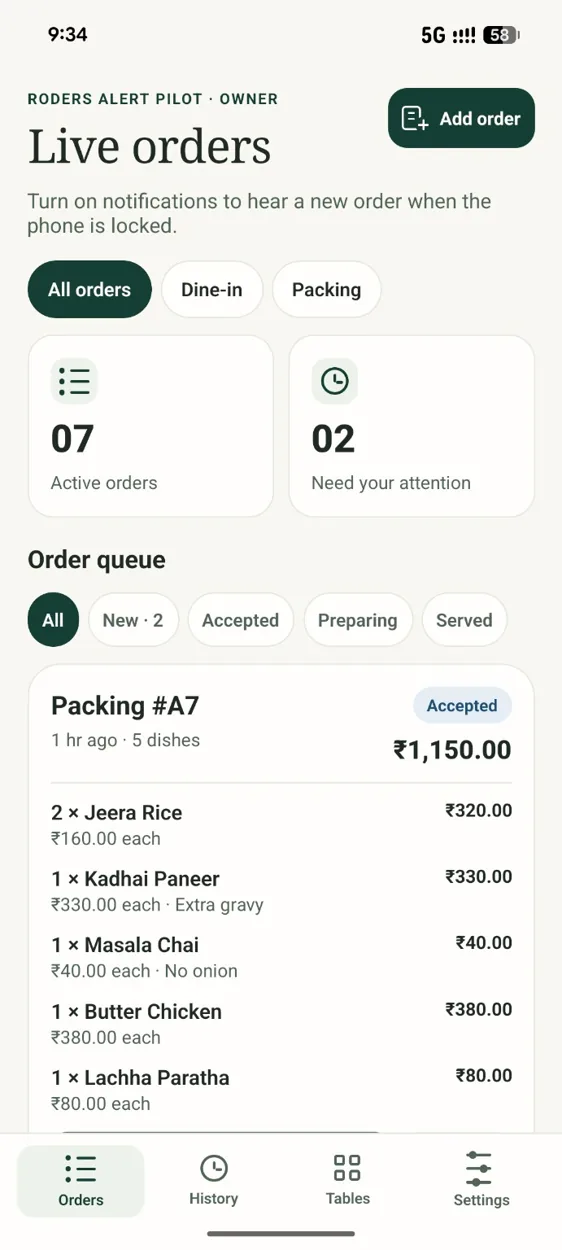
Keep dine-in and packing orders visible in a live workspace, with item details, status updates and the next action easy to find.
What you can do
Built around real restaurant work.
The experience is designed to make a busy team feel more in control, not add steps to the shift.
What this feature includes
- Live queue for dine-in and packing orders
- Accept or reject incoming orders
- Edit dishes and add items during service
- Keep item notes and order history together
In practice
A smoother workflow, step by step.
01
New order arrives
The restaurant sees a placed order with its table or packing context.
02
Accept or reject
An owner or staff member can accept the order or reject it with a reason.
03
Keep details up to date
Staff can make permitted item changes and keep kitchen instructions accurate.
04
Move the work forward
The accepted ticket appears in the kitchen queue.
Ready to explore?
Give your restaurant a smoother shift.
See what Roders can do, then decide if it fits the way your restaurant works.
Practical guide
Restaurant Order Management Checklist: From Table to Kitchen
Clear ownership at every handoff is more important than a long feature list. Use this checklist to make your order flow predictable during peak hours.
Read the full guide ↗